
Optimizing Node.js Development for Real-Time LLM Inference & AI
Optimize Node.js Development for real-time LLM inference with faster AI workflows, better performance, and a scalable backend strategy.
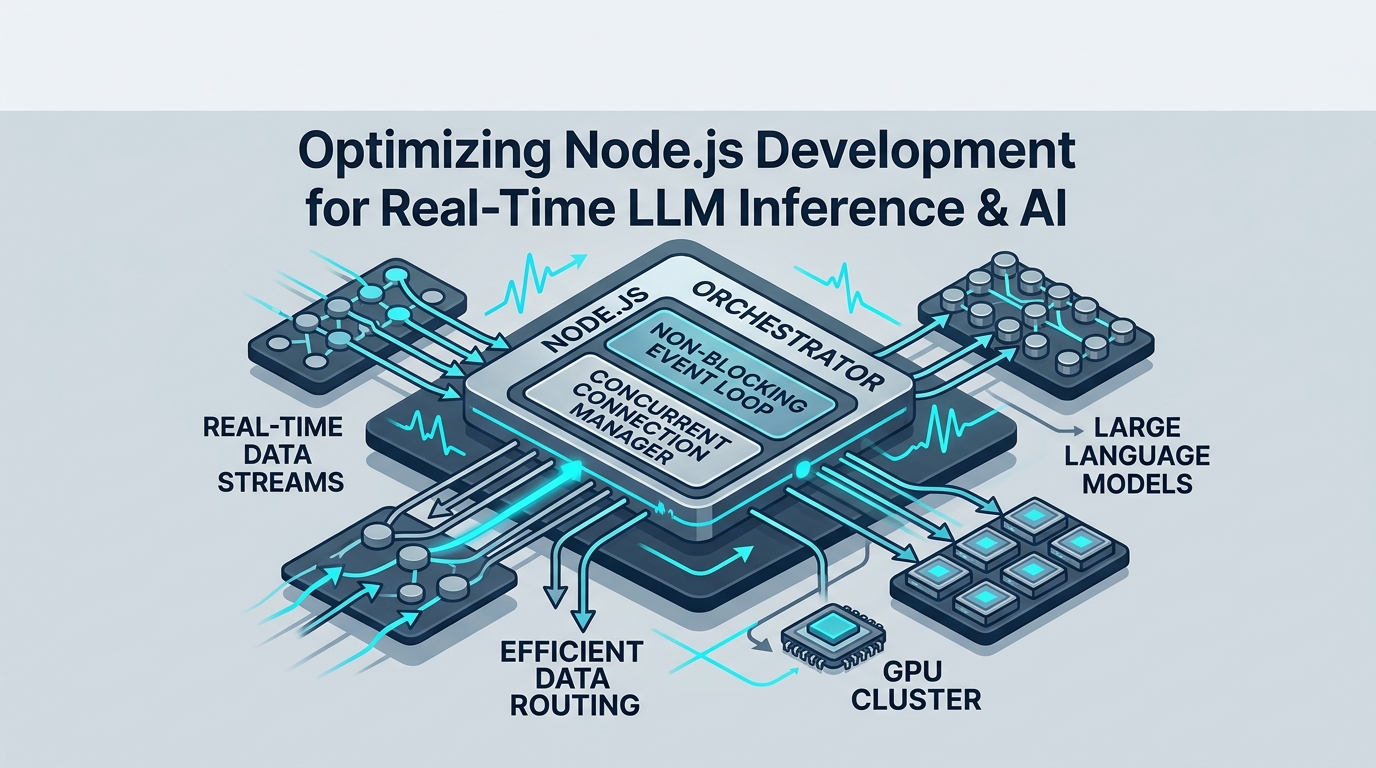
Building real-time AI applications requires a robust backend that can handle high throughput, low latency, and dynamic data streams. When it comes to optimizing Node.js development for real-time LLM inference & AI, the key is to leverage Node.js's strengths as an orchestrator, not as a heavy computational engine, ensuring your applications remain responsive and scalable.
Node.js as an Orchestration Layer: The API Gateway Pattern
In the world of Large Language Models (LLMs), inference can be a resource-intensive operation, often requiring specialized hardware like GPUs. This is where Node.js shines as an intelligent, thin orchestration layer, managing the flow of data without getting bogged down in the heavy lifting of model execution.
Why Node.js Excels for Orchestration
Node.js, with its non-blocking, event-driven architecture, is inherently designed for I/O-bound tasks. This makes it a perfect candidate for an API gateway or backend-for-frontend (BFF) layer in an AI system. Instead of consuming CPU cycles on complex calculations, Node.js excels at managing numerous concurrent connections, routing requests, handling data transformations, and streaming responses efficiently. Its single-threaded event loop processes tasks asynchronously, ensuring that while one request is waiting for a response from an LLM, other requests can be processed or forwarded without delay.
The API Gateway Architecture for LLMs
Consider Node.js as the central nervous system of your AI application, intelligently directing traffic to specialized "organs"—your dedicated LLM inference engines. In this architectural pattern, Node.js acts as an API gateway, sitting between your client applications and the powerful inference engines (like vLLM, SGLang, or even third-party services such as OpenAI API).
Here's how this separation of concerns benefits your AI workflow:
Node.js Handles:
User Authentication & Authorization: Verifying user identities and permissions before forwarding requests.
Rate Limiting & Quotas: Protecting your inference engines from overload and managing API usage.
Input Validation & Data Pre-processing: Ensuring requests conform to expected formats and performing lightweight transformations.
Request Routing: Directing prompts to the appropriate LLM model or inference cluster.
Response Streaming: Efficiently forwarding token-by-token LLM outputs back to the client.
Error Handling & Logging: Centralized management of system-wide issues and diagnostics.
Inference Engine Handles:
GPU-accelerated Model Execution: Performing the actual forward pass of the LLM.
Token Generation: Producing the output tokens efficiently.
Model Loading & Management: Optimizing memory and serving multiple models.
A typical request flow involves a client sending a prompt to the Node.js backend. Node.js authenticates the user, applies rate limits, potentially modifies the prompt, then forwards it to the chosen LLM inference engine. The inference engine processes the request and streams back tokens, which Node.js then efficiently streams onward to the client.
Achieving Real-Time User Experience with LLM Streaming
The magic of real-time AI lies in its responsiveness. Users expect instant feedback, especially from conversational AI.
The Imperative of Token-Level Streaming
Waiting for an entire LLM response to generate before displaying it can lead to frustratingly long perceived latencies, even if the total generation time is reasonable. Token-level streaming dramatically improves user experience by sending individual tokens (or small chunks of tokens) as soon as they are generated by the LLM. This "typewriter effect" keeps users engaged and provides immediate feedback, making the application feel much faster and more interactive.
Implementing Streaming with Server-Sent Events (SSE) and WebSockets
Node.js is exceptionally well-suited for implementing streaming. You have two primary choices:
Server-Sent Events (SSE): Ideal for one-way communication from the server to the client, perfect for LLM output where the client mostly receives data. SSE is built on standard HTTP, uses a simple text-based protocol, and has automatic reconnection capabilities.
// Example: Setting up SSE in an Express.js app
app.get('/stream-llm-response', (req, res) => {
  res.writeHead(200, {
    'Content-Type': 'text/event-stream',
    'Cache-Control': 'no-cache',
    'Connection': 'keep-alive',
  });

  // Simulate receiving tokens from an LLM inference engine
  const llmStream = new Readable({
    read() {
      const tokens = ['Hello', ' ', 'Node', '.js', ' ', 'developers', '!'];
      let i = 0;
      const interval = setInterval(() => {
        if (i < tokens.length) {
          this.push(`data: ${JSON.stringify({ token: tokens[i] })}\n\n`);
          i++;
        } else {
          this.push('data: [DONE]\n\n'); // Signal end of stream
          clearInterval(interval);
          this.push(null); // End the readable stream
        }
      }, 100);
    }
  });

  // Forward LLM stream to client via SSE
  llmStream.on('data', chunk => {
    res.write(chunk);
  });

  llmStream.on('end', () => {
    res.end();
  });

  req.on('close', () => {
    llmStream.destroy(); // Clean up if client disconnects
  });
});
WebSockets: Provides full-duplex, bi-directional communication, making it suitable for more complex interactive scenarios, such as multi-turn conversations or AI agents that require constant client input and server output within the same connection. While SSE is simpler for pure output streaming, WebSockets offer more flexibility if your application needs real-time input from the client mid-stream.
When implementing token streaming, Node.js's native Readable streams and pipe() method are your best friends. You can often pipe the HTTP response stream directly from your LLM inference engine (if it supports streaming) through your Node.js backend to the client, minimizing buffering and latency. Remember to handle partial tokens—sometimes the LLM engine might send incomplete UTF-8 characters; your Node.js backend should buffer these until a complete character can be assembled before forwarding. Libraries like ndjson or custom parsers can help process streaming JSON data.
Preventing Event Loop Blocking: Asynchronous Node.js Development for AI Workflows
Node.js's single-threaded event loop is a powerful model, but it requires careful management. Blocking the event loop means your entire application becomes unresponsive, leading to poor performance and user experience.
Identifying CPU-Bound Tasks in AI Workflows
While Node.js is primarily an orchestrator for LLMs, certain tasks within an AI workflow can still become CPU-bound if not handled correctly:
Complex Data Transformations: Extensive manipulation of large datasets before sending to or after receiving from an LLM.
Custom Embedding Calculations: If you're running lightweight, custom embedding models directly in Node.js (though generally not recommended for heavy models).
Intensive Prompt Templating: Generating highly complex or recursive prompts that involve significant string manipulation or logic.
Synchronous File I/O: Reading or writing large files synchronously.
Heavy Cryptography: Intensive encryption/decryption operations.
Leveraging Node.js Worker Threads
For CPU-intensive tasks that absolutely must run within your Node.js application, Worker Threads are the solution. They allow you to run JavaScript code in parallel, in separate isolated threads, without blocking the main event loop.
// worker.js
const { parentPort } = require('worker_threads');

parentPort.on('message', (taskData) => {
  console.log('Worker received task:', taskData.type);
  // Simulate a CPU-intensive task
  let result = 0;
  for (let i = 0; i < 1e9; i++) { // A very long loop
    result += Math.sqrt(i);
  }
  parentPort.postMessage({ status: 'completed', result: result, originalTask: taskData });
});

// main.js
const { Worker } = require('worker_threads');

function runCpuIntensiveTask(data) {
  return new Promise((resolve, reject) => {
    const worker = new Worker('./worker.js');
    worker.postMessage(data);

    worker.on('message', (msg) => {
      console.log('Main thread received from worker:', msg.status);
      resolve(msg);
    });

    worker.on('error', reject);
    worker.on('exit', (code) => {
      if (code !== 0) reject(new Error(`Worker stopped with exit code ${code}`));
    });
  });
}

// In your API handler:
app.post('/process-data', async (req, res) => {
  try {
    const result = await runCpuIntensiveTask({ type: 'heavyComputation', payload: req.body });
    res.json({ message: 'Task submitted to worker', result });
  } catch (error) {
    res.status(500).send('Error processing task');
  }
});
By offloading these computations to worker threads, your main Node.js process remains free to handle incoming requests, maintain WebSocket connections, and stream LLM outputs, preserving real-time responsiveness.
Asynchronous Queues and Background Job Processors
Not every AI task requires real-time execution. For non-real-time operations like:
Large batch inferences (e.g., processing nightly reports).
Model fine-tuning jobs.
Generating long-form content asynchronously.
Processing user feedback for model improvement.
...asynchronous message queues and background job processors are invaluable. Tools like RabbitMQ, Redis Streams, or dedicated libraries such as BullMQ (built on Redis) allow you to push tasks onto a queue. Separate worker processes can then pick up and process these jobs at their own pace, decoupled from your main Node.js application.
This pattern helps you handle backpressure effectively. If your LLM inference engine or downstream services are temporarily overloaded, instead of failing requests, you can queue them up. Your Node.js backend can gracefully acknowledge the client request (e.g., "Your request is being processed, you'll be notified soon") while the queue system ensures eventual processing without overwhelming your core services.
Intelligent Caching Strategies for LLM APIs
LLM inference, especially with larger models, can be expensive and time-consuming. Caching is a critical optimization to reduce latency, decrease API costs, and improve overall system throughput.
Prompt Prefix Caching
Many prompts share common beginnings. For instance, if users frequently ask "Summarize this article: [article content]" or "Translate this to French: [text]", the "Summarize this article:" or "Translate this to French:" part is a prompt prefix. Caching this prefix means that when an LLM inference engine processes a new prompt, it doesn't need to re-compute the initial tokens for the common prefix. Instead, it can start inference from the cached state associated with that prefix, significantly speeding up the time-to-first-token (TTFT). This is particularly effective for systems that rely on chained prompts or agentic workflows where initial instructions are often repeated.
Full Completion Caching
For prompts that are frequently repeated verbatim and whose outputs are relatively static, caching the full completion is the most straightforward and impactful strategy. When a request comes in, check your cache first. If a complete, valid response exists for the exact prompt and parameters (e.g., model, temperature, top_p), serve it directly from the cache, bypassing the LLM inference engine entirely. This dramatically reduces latency and API costs.
Keying strategies for cached entries are important: combine the prompt input with other relevant LLM parameters (model name, temperature, max tokens, etc.) to form a unique cache key. Hashing this combined string is a robust approach.
const crypto = require('crypto');
const NodeCache = require('node-cache'); // A simple in-memory cache

const llmCache = new NodeCache({ stdTTL: 3600, checkperiod: 600 }); // Cache for 1 hour

function generateCacheKey(prompt, model, params) {
  const hashInput = JSON.stringify({ prompt, model, params });
  return crypto.createHash('sha256').update(hashInput).digest('hex');
}

async function getLlmCompletion(prompt, model, params) {
  const cacheKey = generateCacheKey(prompt, model, params);
  const cachedResponse = llmCache.get(cacheKey);

  if (cachedResponse) {
    console.log('Serving from cache:', prompt);
    return cachedResponse;
  }

  console.log('Fetching from LLM API:', prompt);
  // --- Replace with actual LLM API call ---
  const llmResponse = await new Promise(resolve => setTimeout(() => {
    resolve(`This is a generated response for "${prompt}" using ${model}.`);
  }, 500 + Math.random() * 1000));
  // --- End LLM API call simulation ---

  llmCache.set(cacheKey, llmResponse);
  return llmResponse;
}

// Usage in an API endpoint:
app.post('/ask-llm', async (req, res) => {
  const { prompt, model = 'gpt-3.5-turbo', params = {} } = req.body;
  try {
    const completion = await getLlmCompletion(prompt, model, params);
    res.json({ completion });
  } catch (error) {
    res.status(500).send('Error generating completion');
  }
});
Effective Invalidation and TTL Management
Caching is only effective if the data remains fresh.
Time-To-Live (TTL): Set appropriate TTLs for cached items. For general knowledge queries, a longer TTL (hours or days) might be acceptable. For context-aware applications or those dealing with rapidly changing data, TTLs might be much shorter (minutes).
Invalidation Strategies: For dynamic content, you might need explicit invalidation. If the underlying data that an LLM would generate a response from changes (e.g., a document summarized by an LLM is updated), you should programmatically invalidate the relevant cache entries. This can be done by deleting specific keys or using tagged caching systems.
Optimizing External LLM API Interactions & Concurrency
When your Node.js backend communicates with external LLM APIs (like OpenAI, Anthropic, or your own vLLM instance), optimizing these interactions is crucial for performance and reliability.
Persistent Connections and Connection Pooling
Establishing a new HTTP/HTTPS connection for every API call introduces overhead due to TCP handshakes and TLS negotiation. Persistent connections (using Connection: keep-alive HTTP header) allow a client and server to reuse the same TCP connection for multiple requests, dramatically reducing latency.
Node.js provides http.Agent and https.Agent for managing connection pooling.
const https = require('https');
const axios = require('axios'); // A popular HTTP client

// Create a custom agent for persistent connections
const agent = new https.Agent({
  keepAlive: true,        // Enable keep-alive
  maxSockets: 100,        // Max sockets per host
  timeout: 60000,         // Socket timeout in milliseconds
});

// Configure Axios to use the custom agent
const openaiAxios = axios.create({
  baseURL: 'https://api.openai.com/v1',
  httpsAgent: agent,
  headers: {
    'Authorization': `Bearer YOUR_OPENAI_API_KEY`,
    'Content-Type': 'application/json',
  },
});

async function callOpenAIWithPersistentConnection(prompt) {
  try {
    const response = await openaiAxios.post('/chat/completions', {
      model: 'gpt-3.5-turbo',
      messages: [{ role: 'user', content: prompt }],
      stream: true, // Example for streaming
    }, {
      responseType: 'stream', // Important for streaming responses
    });

    return response.data; // This is a Readable stream
  } catch (error) {
    console.error('Error calling OpenAI:', error.message);
    throw error;
  }
}

// In an API handler:
app.post('/chat', async (req, res) => {
  const { prompt } = req.body;
  try {
    const stream = await callOpenAIWithPersistentConnection(prompt);
    res.writeHead(200, {
      'Content-Type': 'text/event-stream',
      'Cache-Control': 'no-cache',
      'Connection': 'keep-alive',
    });
    // Pipe the OpenAI stream directly to the client's SSE connection
    stream.pipe(res);
  } catch (error) {
    res.status(500).send('Failed to get response from LLM.');
  }
});
Robust Retry Mechanisms and Circuit Breakers
External APIs can be flaky. Implementing robust error handling is paramount:
Retry Mechanisms with Exponential Backoff: For transient errors (e.g., network glitches, API rate limits), retrying the request after a short delay, with exponentially increasing delays between retries, is effective. Libraries like
p-retryor custom logic can implement this.Circuit Breakers: To prevent cascading failures when an external service is completely unresponsive, use a circuit breaker pattern. If an API repeatedly fails, the circuit breaker "trips," preventing further requests from being sent to that service for a set period. This allows the failing service to recover and prevents your application from wasting resources on doomed requests. Libraries like
opossumcan help implement this.
Managing High Concurrency and Scaling
Node.js is excellent at handling many concurrent connections, but scaling beyond a single process is essential for production AI workflows:
Load Balancing: Use a load balancer (e.g., Nginx, HAProxy, AWS ELB) to distribute incoming requests across multiple Node.js instances.
Clustering: Node.js's built-in
clustermodule allows you to fork multiple Node.js processes that share the same port, effectively utilizing multi-core CPUs. Tools like PM2 simplify cluster management.Resource Allocation: Monitor CPU, memory, and network usage. Ensure your Node.js instances have sufficient resources allocated in your hosting environment (VMs, containers).
Connection Limits: Configure your Node.js application and any proxies to handle a high number of open connections without hitting OS limits.
Integrating with Dedicated Inference Engines like vLLM and SGLang
While Node.js is the orchestrator, specialized inference engines are the powerhouses for LLM execution.
The Role of Specialized Inference Engines
Inference engines like vLLM and SGLang are engineered specifically for high-throughput, low-latency LLM serving on GPUs. They incorporate advanced techniques such as:
PagedAttention (vLLM): Efficiently manages GPU memory, allowing for much larger batch sizes and higher throughput without sacrificing latency.
Continuous Batching: Processes incoming requests continuously, rather than waiting for a full batch, maximizing GPU utilization.
Optimized CUDA Kernels: Highly optimized low-level operations for common LLM layers.
These optimizations make them vastly superior to running inference directly within a general-purpose application layer.
Node.js as a Client to High-Performance Engines
Your Node.js backend will typically interact with vLLM (or similar engines) via their exposed REST or gRPC APIs.
// Example: Interacting with a vLLM server via REST
const axios = require('axios');

const vllmClient = axios.create({
  baseURL: 'http://localhost:8000/v1', // Assuming vLLM server runs locally on port 8000
  headers: {
    'Content-Type': 'application/json',
  },
});

async function getVLLMCompletion(prompt, model = 'Llama-2-7b-chat-hf', stream = false) {
  try {
    const response = await vllmClient.post('/chat/completions', {
      model: model,
      messages: [{ role: 'user', content: prompt }],
      stream: stream,
      max_tokens: 512,
      temperature: 0.7,
    }, {
      responseType: stream ? 'stream' : 'json',
    });

    if (stream) {
      return response.data; // A readable stream
    } else {
      return response.data.choices[0].message.content;
    }
  } catch (error) {
    console.error('Error calling vLLM:', error.message);
    throw error;
  }
}

// In an API handler, similar to OpenAI example, you'd pipe this stream to the client.
Node.js's role here is to:
Orchestrate Complex Workflows: For agentic AI applications, Node.js can make multiple, sequential calls to the inference engine. For example, "Analyze user query -> search database -> summarize results -> generate response -> validate response," where each step might involve a distinct LLM call.
Handle Structured Output Parsing: LLMs can generate structured JSON output. Node.js can parse and validate this output before passing it downstream or back to the client.
Propagate Streaming: Crucially, if the inference engine supports token-level streaming, Node.js can efficiently receive this stream and pipe it directly to the end-user, ensuring that real-time experience is preserved across the entire stack.
End-to-End Observability for Production AI Workflows
In production, you can't optimize what you can't measure. Comprehensive observability is non-negotiable for real-time LLM systems.
Key LLM-Specific Metrics
Monitoring goes beyond traditional server metrics. For real-time LLM inference, track:
Token Generation Latency: Time taken to generate X tokens, often broken down by token per second.
Time-To-First-Token (TTFT): The critical metric for perceived latency, measuring the time from request start to the first output token.
Queue Depth: How many requests are waiting to be processed by your Node.js backend or inference engine.
Error Rates: Specific errors from LLM APIs (e.g., rate limits, invalid prompts) and your Node.js application.
Prompt/Completion Costs: For third-party APIs, track usage and costs to manage budgets.
GPU Utilization (if exposed by inference engine): Essential for understanding the load on your inference hardware.
Distributed Tracing and Logging
When requests traverse multiple services (client -> Node.js -> LLM engine -> potentially other microservices), identifying bottlenecks requires distributed tracing. Tools like OpenTelemetry allow you to instrument your Node.js application to generate traces that link all operations related to a single user request, providing a holistic view of its journey.
Structured logging is also vital. Log LLM-specific details:
Incoming prompt and its length.
Model used.
Time-to-first-token.
Total generation time.
Number of input/output tokens.
Any pre/post-processing steps.
Error messages.
This data, when stored in a centralized logging system, becomes searchable and invaluable for debugging and analysis.
Real-Time Monitoring Dashboards
Aggregate your metrics and logs into real-time monitoring dashboards using tools like Grafana (with Prometheus), Datadog, or New Relic. These dashboards should provide:
System Health Overview: CPU, memory, network, uptime of Node.js instances and inference engines.
LLM Performance at a Glance: Average TTFT, token/second throughput, error rates, costs.
Request Latency Distribution: Histograms showing the spread of response times.
Alerting: Set up alerts for critical thresholds (e.g., high error rates, long queue depths, low GPU utilization indicating an issue).
By meticulously observing your Node.js and LLM infrastructure, you gain the insights needed to continuously optimize performance, identify issues proactively, and ensure a smooth, responsive experience for your AI application users.
What are your biggest challenges or most effective optimizations when running Node.js backends for real-time LLM inference in production?
💬 Join the conversation — share your take in the comments and tell us what you’d add.