
Mastering Reaction Video Creation: Your ClipCam Mobile Workflow
Master reaction video creation with a mobile-first workflow that saves time, boosts quality, and helps you publish faster. Start now.
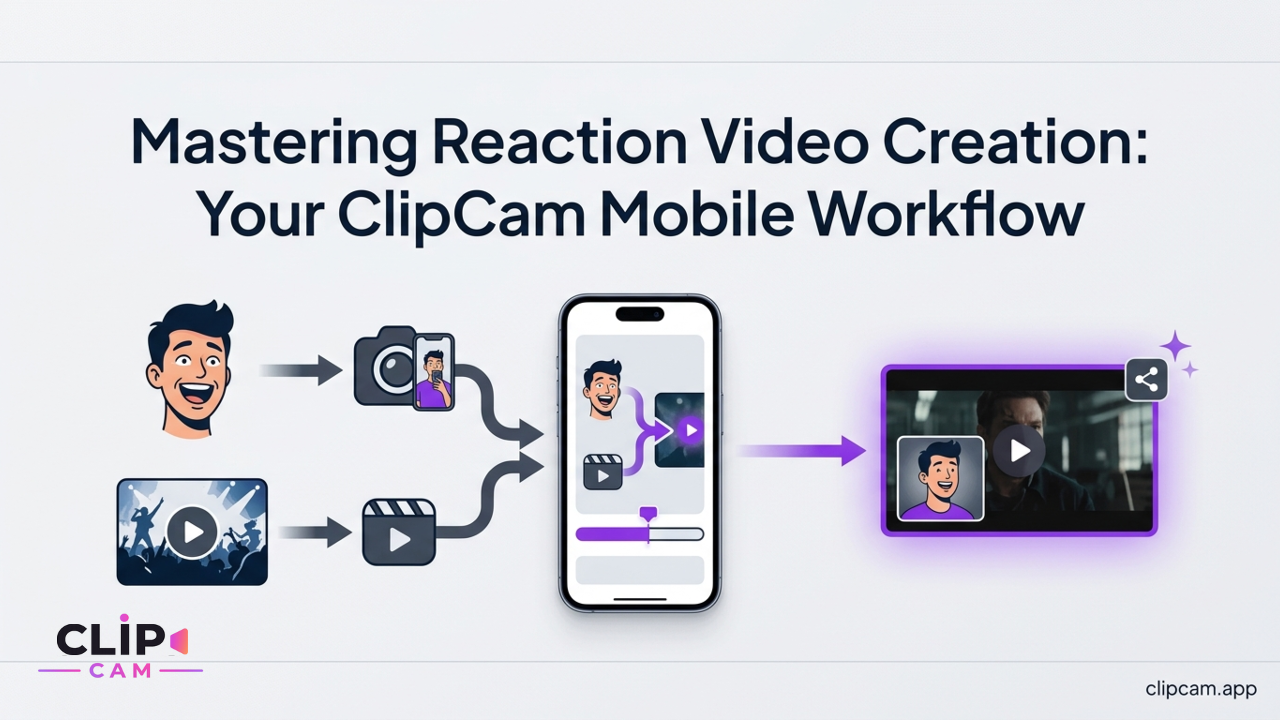
Gone are the days when creating engaging reaction videos meant wrestling with complex desktop editing software. Imagine capturing your spontaneous, authentic reactions to your favorite clips directly from your phone, with professional-grade results delivered in minutes. This is the power of ClipCam, the ultimate mobile workflow solution for mastering reaction video creation.
ClipCam isn't just an app; it's a complete revolution for mobile creators, designed to eliminate the friction between inspiration and publication. It empowers you to record your genuine expressions alongside any video content, merge them seamlessly, and share your masterpiece with the world, all without ever touching a desktop computer.
Unlock Seamless Reaction Video Creation on Mobile with ClipCam
For content creators looking to make a splash on platforms like YouTube Shorts, TikTok, Instagram Reels, and X, speed and authenticity are paramount. ClipCam stands out as the ultimate mobile solution for reaction video creation, completely eliminating the need for desktop editing. It transforms your smartphone into a powerful, portable studio, allowing you to capture compelling content the moment inspiration strikes.
At its core, ClipCam offers the fastest way to record reactions over your favorite clips, entirely from your phone. Whether you're reacting to a viral trend, a new music video, a gameplay highlight, or an educational short, ClipCam ensures your perspective is captured and shared effortlessly. The app's design emphasizes unparalleled ease of use: imagine dual-window recording that simultaneously plays your source content and captures your face, automatic rendering that takes care of layout and synchronization, and one-tap sharing that puts your finished video directly onto your preferred social platforms. This seamless process means less time fiddling with technicalities and more time focusing on what truly matters: your engaging reaction (ClipCam).
The ClipCam Advantage: Effortless End-to-End Workflow
ClipCam redefines the entire reaction video creation process by integrating every necessary step into one intuitive mobile application. This means no more transferring files, no more struggling with timeline synchronization, and definitely no more learning complicated software. It’s an end-to-end workflow designed for efficiency and creativity.
Record Your Face While Watching Any Video
A common hurdle for mobile creators is figuring out, "How do you make a reaction video on your phone?" ClipCam simplifies this dramatically. Its unique dual-window recording feature allows you to play your chosen source content while simultaneously recording your face and reactions. You simply import the video you want to react to, and ClipCam handles the rest, presenting both feeds in a dynamic, adjustable interface. This synchronized recording ensures perfect timing between the source content and your live reaction, capturing every nuanced expression and comment exactly as it happens. You're not just watching a video; you're actively creating alongside it.
Automatic Merging for Perfect Layouts
Once your reaction is recorded, the next question often becomes, "How do you put a reaction video side by side?" With traditional methods, this is where the editing software comes into play, requiring manual cropping, resizing, and precise placement. ClipCam, however, makes this process entirely automatic. Immediately after recording, ClipCam's intelligent system renders your video into various professional layouts. You can choose from side-by-side, stacked, or picture-in-picture (PiP) formats with a single tap. This automatic merging capability saves countless hours of post-production work, ensuring your finished video looks polished and professional without any manual tweaking. The layouts are optimized for mobile viewing and social media platforms, guaranteeing your content looks great no matter where it's shared.
Streamlined Process Eliminates Desktop Editing
The most significant advantage of the ClipCam workflow is its complete elimination of desktop editing. Every step, from importing your source video to adding effects and exporting the final product, is handled within the app. This means ClipCam exports a single, ready-to-post file – a fully merged, perfectly synchronized reaction video that's ready for immediate upload. This makes it the easiest and fastest way to create reaction videos without requiring separate desktop software, specialized skills, or costly equipment. For creators on the go, or those who simply prefer the convenience of mobile creation, ClipCam is an indispensable tool that dramatically streamlines the entire production pipeline.
Step-by-Step with ClipCam: From Source Selection to Reaction
Getting started with ClipCam is intuitive, even for those new to reaction video creation. The app is designed to guide you through each stage, ensuring a smooth and successful experience from your very first clip.
Selecting and Importing Your Source Content
The journey begins with choosing the content you want to react to. ClipCam offers robust flexibility here. You can easily select video clips from your device's photo library, allowing you to react to downloaded videos, personal footage, or previously saved content. Beyond local files, ClipCam also supports importing videos directly from the web. This means you can find a trending video on YouTube, TikTok, or another platform, and bring it directly into the ClipCam app to begin your reaction without ever leaving the mobile environment. The app's user-friendly interface makes this selection and import process quick and straightforward, getting you to the creative part faster.
Optimizing Your Environment for Recording
While ClipCam handles the technical merging, optimizing your physical recording environment can significantly enhance the quality of your reaction video.
Lighting: Ensure you are well-lit, preferably with soft, natural light facing you. Avoid harsh backlighting that can silhouette your face.
Audio: Good audio is crucial for clear commentary. ClipCam is designed to capture high-quality audio, supporting both your phone's built-in microphone and external audio input devices (like lavalier mics or earbuds with mics) for even clearer sound. Position yourself in a quiet space to minimize background noise.
Background: Keep your background clean and uncluttered. A simple, appealing backdrop helps keep the focus on you and your reaction.
Stability: Use a phone stand or tripod to keep your device stable. This prevents shaky footage and allows you to focus entirely on your reactions without holding the phone.
Leveraging ClipCam's In-App Recording Tools
ClipCam's recording interface is packed with features designed for maximum control and spontaneity. As the source video plays, your facecam records simultaneously.
Pause-and-Scrub: A standout feature is the ability to pause the source content and scrub back or forward during recording. This is invaluable for precise reactions – if something happens too fast, you can pause, rewind a few seconds, re-watch, and then deliver a more considered or emphatic reaction. This ensures you never miss a beat and can react to specific moments with perfect timing.
Draggable Facecam: You have the freedom to drag and resize your facecam window anywhere on the screen during recording. This allows you to avoid obscuring important parts of the source video and to find the most aesthetically pleasing composition for your facecam within the frame, adapting on the fly.
Planning Commentary: While reactions can be spontaneous, a little planning goes a long way. Think about key moments you want to address or specific points you want to make. Maintain engaging expressions throughout the recording – your non-verbal cues are just as important as your verbal commentary in conveying your genuine reaction. ClipCam's intuitive design supports both spontaneous outbursts and more structured commentary, giving you the flexibility to react authentically.
Enhancing Your ClipCam Reaction: Polishing for Professional Results
After capturing your initial reaction, ClipCam empowers you to refine and polish your video within the app, ensuring it meets professional standards before it ever reaches your audience. This comprehensive approach means you can achieve a high-quality finished product without leaving your mobile device.
Choosing the Best Layout for Mobile Viewing
One of the key considerations for reaction video creation, especially for short-form platforms, is selecting the right visual layout. "What layout is best for a mobile reaction video?" is a frequent question. ClipCam offers immediate post-recording options for optimal viewing.
Side-by-Side: Ideal for clear comparison and when both the source content and your face need equal prominence. This layout works well for landscape-oriented source videos or when you want a classic reaction look.
Picture-in-Picture (PiP): Perfect for scenarios where the source content needs to dominate the screen, with your reaction appearing in a smaller, overlaying window. This is especially effective for vertical-format short-form videos like TikToks or Reels, allowing the primary content to fill the screen while your reaction is still visible and engaging. ClipCam ensures that whichever layout you choose, it will be automatically formatted to look clean and professional, maximizing impact on mobile screens.
Adding Visual Flourish with Built-in Effects
Beyond simply merging videos, ClipCam includes integrated features for adding visual flair directly within the app. You can enhance your reaction video with:
Captions: Add text overlays to highlight specific comments, provide context, or make your video more accessible. ClipCam's caption tools are easy to use, allowing you to customize font, color, and placement.
Filters: Apply various filters to adjust the mood and aesthetic of your video, giving it a distinct look and feel.
Visual Effects: Explore other built-in effects that can add an extra layer of engagement, from subtle enhancements to more dynamic visual elements. These features mean you don't need a separate editing app for basic visual enhancements, keeping your workflow entirely within ClipCam.
Ensuring Crystal-Clear Commentary
A great reaction video isn't just about what you show, but also what you say. A common challenge is "How do you add commentary to a reaction video?" while ensuring it doesn't get lost or overpowered by the source audio. ClipCam addresses this with intelligent audio management.
Audio Balancing: ClipCam allows you to adjust the volume levels of both your commentary track and the source video independently. This is crucial for ensuring your voice is clear and prominent, preventing the source audio from overpowering your reaction. You can easily duck the source audio slightly when you're speaking, bringing it back up when you're just reacting visually.
Noise Reduction: While ambient noise is best managed at the recording stage, ClipCam's processing helps maintain overall audio clarity, making sure your words are crisp and easily understood by your audience. Before exporting, ClipCam allows you to review the final merged video within the app. This is your opportunity to watch it as your audience would, checking for optimal audio balance, visual composition, and overall quality. This final review ensures your content is polished and ready to make an impact.
Seamless Sharing: Distributing Your ClipCam Masterpiece
The final step in your ClipCam workflow is arguably the most exciting: sharing your creation with the world. ClipCam is engineered for rapid distribution, understanding that timely uploads are key to capitalizing on trends and audience engagement.
One-Tap Export and Direct Sharing
Once you're satisfied with your polished reaction video, ClipCam streamlines the export process. With one-tap download functionality, your high-quality, fully merged video is saved directly to your device's gallery, ready for anything. But the real magic lies in its direct sharing capabilities. ClipCam enables one-tap sharing to a multitude of popular social media platforms, addressing the common question, "How do you share a reaction video to YouTube Shorts, TikTok, Instagram Reels, and X?" You don't need to manually open each app and navigate through upload menus; ClipCam offers direct links, drastically cutting down the time from creation to publication. This ensures your content hits the feeds when it's most relevant and engaging.
Optimizing for YouTube Shorts, TikTok, Instagram Reels, and X
ClipCam goes beyond just direct sharing; it optimizes your output specifically for the unique demands of each platform.
Platform-Native Formats: Whether it's the vertical aspect ratio favored by TikTok and Instagram Reels, or the more flexible orientations for YouTube Shorts and X, ClipCam intelligently formats your video to meet these specifications. This means your video will always look natural and professional within the native player of each platform, avoiding awkward cropping or black bars.
Aspect Ratios: ClipCam handles the conversion and scaling necessary for optimal display across various short-form content platforms. For instance, creating a 9:16 vertical video for TikTok or a 16:9 horizontal video for YouTube, or a square format for Instagram feeds, is seamless. This optimization ensures maximum visibility and engagement, as content that fits the platform's standard is more likely to perform well.
Maximizing Visibility and Engagement: When sharing your ClipCam videos, consider adding relevant hashtags, engaging captions, and calling for interactions. Since ClipCam handles the technical aspects of formatting, you can focus on the strategic elements of posting. For YouTube Shorts, use compelling titles and descriptions. On TikTok and Reels, leverage trending sounds and challenges. On X, use concise text and relevant @mentions. ClipCam gives you the perfect canvas; your smart sharing practices will paint the masterpiece.
Pro Tips for High-Quality Reaction Video Creation with ClipCam
Achieving truly high-quality results in reaction video creation with ClipCam is within reach for every creator. Beyond the core features, a few advanced tips can elevate your mobile productions to a professional standard.
For starters, pay close attention to framing your facecam and source clip effectively within ClipCam's layout options. Experiment with different positions for your facecam – sometimes a smaller, less obtrusive corner placement works best, while other times a larger, more prominent display of your expressions is ideal. ClipCam’s draggable facecam allows you to make these adjustments even during recording, giving you dynamic control over your on-screen presence. Consider the rule of thirds for your facecam placement to create a visually appealing composition, even within a dynamic layout.
Reinforce best practices for maintaining consistent audio quality using ClipCam's features. While recording, try to speak clearly and maintain a consistent distance from your phone's microphone (or external mic). Post-recording, utilize ClipCam's audio balancing tools to ensure your commentary is always audible without being jarringly loud or too soft. Actively listen for any background noise you can minimize during recording, as even ClipCam's processing can only do so much to correct inherently poor audio capture. Clear audio is paramount for viewer engagement and comprehension.
Before hitting that share button, make it a habit to review the final ClipCam export meticulously. Watch the entire video, paying close attention to synchronization, audio levels, visual clarity, and the overall flow of your reactions. This final check is crucial for catching any last-minute adjustments, ensuring that "How do you make a high-quality reaction video from your phone?" is fully answered with every piece of content you produce. Look for any unintended distractions, awkward pauses, or moments where your reaction feels disconnected from the source material. This critical eye will significantly improve the perceived professionalism of your content.
In summary, ClipCam empowers creators to achieve professional-grade results directly from their mobile device. By combining intuitive recording, automatic merging, powerful editing tools, and seamless sharing, ClipCam removes the technical barriers, allowing you to focus entirely on your creativity and genuine reactions. It's the definitive tool for anyone serious about mastering mobile reaction video creation.
Ready to revolutionize your reaction video creation? Download ClipCam today and start making high-quality, engaging content effortlessly from your phone!